Wednesday, February 15, 2012

SQL Server Best Practices (DOs, DONTs)

Introduction

Although every application is different, in general, the procedures which can be followed to resolve performance problems residing in or around SQL Server are generally the same.

This article suggests several approaches which can be taken to tackle such problems, although it is preferable to try and avoid them in the first place by following a series of best practices and by avoiding some common pitfalls. 

Best Practices
This section lists some best practices which should be applied when writing SQL, and also to ADO/ADO.NET code interfacing with databases. It is broken up into three sections:

Vital - Critical performance issues can result where these guidelines are disregarded. Occasionally there may be situations where these rules cannot be enforced, but these must be viewed as "rare exceptions".

Important - Implementing these guidelines can help avoid or alleviate serious performance issues.

Recommended - Although not always relevant or practical, it is often worth evaluating these guidelines.

Brief justification is given for each rule, however, the underlying issues are often complex and they should not be viewed as conclusive.

Vital
  • DO NOT use "inline" SQL Statements – use Stored Procedures in all points of contact between the database and application layer(s). Stored Procedures have compiled and cached execution plans.
  • DO NOT use dynamic SQL statements. Dynamic SQL must be compiled every time it is executed, wasting resources (and Stored Procedures containing dynamic SQL will also recompile, which can cause object-level locking issues).
  • DO NOT use "Table Valued" functions. These will always process the entire query contained within, and generate extra overhead through table variable population – often much data is discarded upon joining to the results of a function.
  • DO NOT use Cursors against "permanent" tables. The locking strategies employed by cursors can cause rapid lock escalation and some severe contention issues. Use the "while loop" construct, or cursors based on temporary objects instead.
  • DO consider indexing strategy carefully when creating or amending schema. Poorly indexed tables are inefficient – the query optimizer will not be able to efficiently retrieve the rows that it requires.
  • DO include a "WHERE" clause. This is refered to as "SARGability" – Search ARGuments allow SQL Server to prune the result set at the earliest opportunity.
  • DO use table variables instead of standard temporary tables. Temporary tables can cause recompiles due to statistical updates and context switches, leading to problems with object-level locking. Table variables are also stored in heap memory when possible.
  • DO NOT drop temporary tables explicitly. SQL Server will automatically clean these up when they fall "out of scope" (e.g. execution chain has completed). An explicit DROP TABLE operation on a temporary table will cause a recompile event to occur.
  • DO set the "NOCOUNT" option on for all stored procedures which do not need to be aware of the number of records affected. This prevents SQL Server returning extra statistics to the client.
  • DO use disconnected ADO record set objects. Retaining an open record set can cause ADO to run through cursors on the SQL Server when retrieving data.
  • DO close all connection and record set objects as soon as they are no longer required. Retaining an unnecessary open connection can cause errors (only one record set can be open for one connection at a time in some modes of operation), and can also tie up valuable system resources.
  • DO NOT use the OR operator in JOIN predicates and WHERE clauses. This operator can cause poor index use (or table scans), as SQL attempts to match up and merge alternative sets of data. Consider use of UNION [ALL] if this sort of behaviour is definitely required.
  • DO NOT use the IN operator. Make use of "EXISTS" instead, as this allows SQL Server to look up the data in the condition clause, rather than forcing it to spool through a set of values. This is particularly relevant when the clause is a co-related sub-query.
  • DO NOT use distributed transactions unless there is no other option. Locking data in a local (explicit) transaction has serious enough implications, without extending the locking to another database which is physically separated from the current context.
Important
  • DO NOT use scalar functions in queries which process a large number of rows. Due to the way SQL Server processes this sort of operation, long query durations can result (although typically without heavy resource use – a common cause of slow running queries).
  • DO NOT use sub-queries. The entire sub-query result set is often evaluated, even if many of the rows are eliminated immediately by the way the sub-query is joined to the main query.
  • DO prefix the identifiers of all objects with the name of their owner to ensure SQL Server immediately selects the correct context. E.g. Prefix all Stored procedures, Tables, Functions and Views owned by the database owner with "dbo".
  • DO NOT use LEFT JOIN if possible – due to the nature of this operation, SQL Server is often unable to make efficient use of the available indexes. Consider using UNION [ALL] and two INNER JOINed queries instead.
  • DO NOT use the DISTINCT operator. In many cases duplicate rows can be eliminated through restructuring of a query – there are very few circumstances where DISTINCT is actually necessary.
  • DO use UNION ALL when possible, instead of UNION – adding the modifier "ALL" prevents SQL Server from performing a DISTINCT operation on the data sets during merging.
  • DO minimise the length of any explicit transactions. The longer a transaction, and the more objects involved, the worse the impact which it will have on concurrency.
  • DO reference indexed columns in join predicates and where clauses. This will allow SQL Server to leverage indexes and minimise the size of the data set being processed earlier rather than later.
  • DO NOT apply the ORDER BY clause to a set of data unless it is absolutely required (e.g. for front-end presentation). Never sort data into a table where the clustered index sequence differs from the ORDER BY. Sorting data is expensive, and sorting against the clustered index is pointless as SQL Server will automatically re-sequence the data upon insertion.
  • DO NOT use triggers to maintain data in regularly accessed tables. While useful for change-logging, firing triggers at (or from) busy tables can cause serious contention issues.
Recommended
  • DO use table variables to break up large queries, avoid repetition of work throughout a Stored Procedure and minimize contention through locking. Preparing data ahead of time can allow you to complete ACID safe work in a transaction without taking out locks on source data.
  • DO use locking hints to avoid lock escalation when the affected record count is known to be small, or to ensure other scenarios (dirty reads, retained locks, etc). Be careful though, as inappropriate use of locking hints can cause excessive contention (or insufficient contention, resulting in an error when data being read with NOLOCK is modified during the read operation).
  • DO NOT join together datasets where the clustered index contains similar columns in a different order; this can cause a bookmark lookup or heavy sort operation to occur. Remember that clustered indexes define the order of the data in a table.
  • DO keep code as simple as possible. Several short, simple SQL statements will almost always operate more efficiently than one huge query. This also improves maintainability.
  • DO NOT use RPC unless there is no other option. While useful, RPC is phenomenally expensive when compared to a normal query, because both the query execution request and result set (even if only return value or output parameters) are crossing a physical network boundary.

Tuesday, February 7, 2012

Introduction to SQL Server Profiler

Introduction

Microsoft SQL Server Profiler is a graphical user interface to SQL Trace for monitoring T-SQL Statements of Database Engine. We can save and reuse the state at a later point of time.
  • We can do the following using SQL Server Profiler
    • Create a trace
    • Watch the trace results as the trace runs
    • Store the trace results in a table
    • Start, stop, pause, and modify the trace results as necessary
    • Replay the trace results
  • Use SQL Server Profiler to monitor only the events in which you are interested.
Menu Path: Start | All Programs | Microsoft SQL Server 2005 | Performance Tools | SQL Server Profiler.
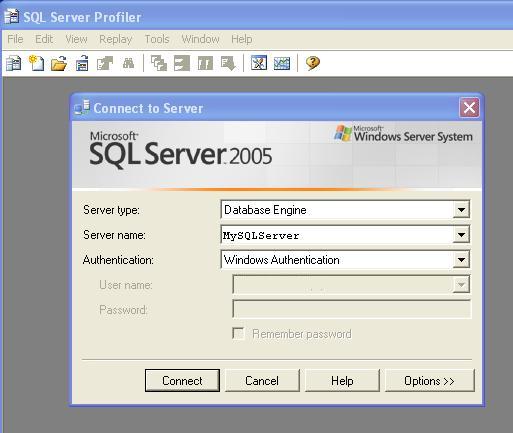
The following screen will come:

Screenshot - pic1.jpg
Figure 1.0
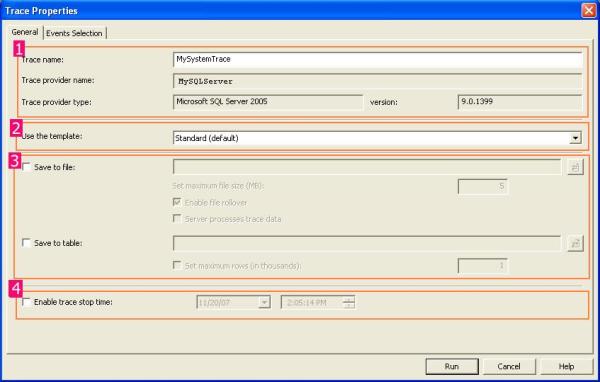
Click on <Connect> Button. New Properties Screen will come:
Screenshot - properties.jpg
Figure 1.1
It has two selection tabs:
  • General: It is used for general setting for Trace Database Engine.
  • Event: It is used to add or remove some selected event for monitor.
In General Section (as given in Figure 1.1), it is divided into four sections.
Section 1: In this section, you have to just specify the name of your trace, Trace provider name and server name are predefined and based upon your SQL Server.
And it is not editable.
Section 2: It is the template section. You can choose different type of Templates based upon your requirements. It is the configuration for trace. By default, it is "Standard (Default)" templates. Others templates are T-SQL, T-SQL Duration, T-SQL Reply, T-SQL SPs, etc. You can create your own custom Templates by selecting different Events and Event Class. It is saved as ".tdf" Extension.
Section 3: This section is related to save your trace. Either as File (.trc) or in a database. as table. While clicking on Save to file check box, File save dialog box should open and you can save that file (with .trc extension).
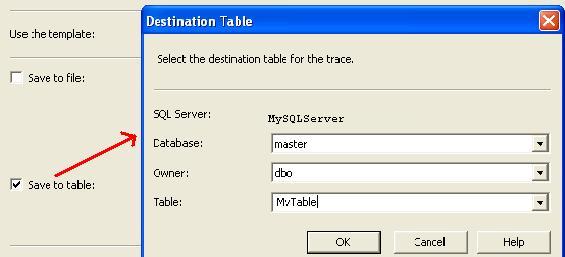
If you check the "Save to Table", it will connect with your server and ask you to which database you want to save that trace table information.

Screenshot - savetotable.jpg
Figure 1.2
Section 4: You can stop your trace on a particular time. Check the "Enable trace stop time" checkbox and give the time at which you want to stop track, SQL Server will automatically stop trace on that time.
Now Move To "Event Section" Tab.
Now we need to know some definition with respect to SQL Server Profiler.

What is an Event?

An Event is an action or operation that is performed in your SQL Server 2005 Database Engine.
Some examples of Events are:
    • Transact-SQL SELECT, INSERT, UPDATE, and DELETE statements.
    • User login and logout
    • Execution of Stored procedures
    • Operation with cursor
SQL Server profiler is able to trace all of these events and all these events are categories on a particular Event class.

What is an Event Class?

Event class is a type of event that can be traced.
Some examples are:
  • SQL: BatchCompleted
  • SQL: Batch Starting
  • Audit Login
  • Audit Logout
  • Lock: Acquired
  • Lock: Released
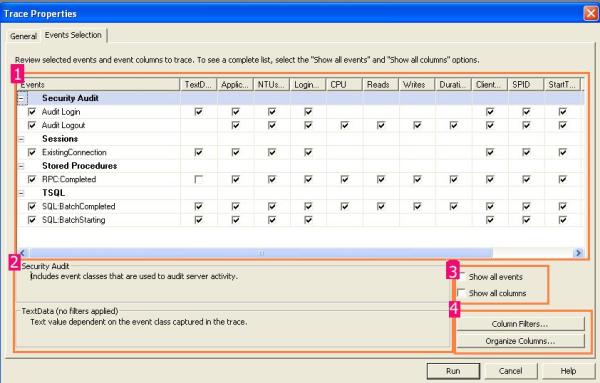
Now you can select events from this screen:

Screenshot - events.jpg
Figure 1.3 
In section 1, we can select the proper check box based upon our requirement, section 2 will display the details of Selected events and Events class. If you check in the check box of section 3, you will get all the list of Events and Columns in Section 1.
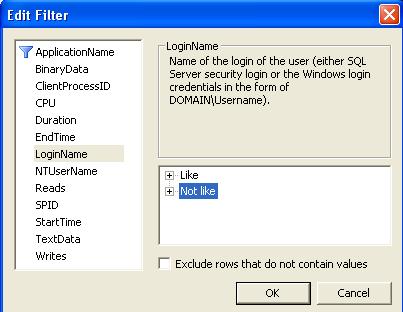
Section 4 is something like customization. Just click on the "Column Filter Button". In this section, you can specify some condition (like or Not like).

Screenshot - Filter1.jpg
Figure 1.4 
By clicking on "Organize Column" button, you can change the sequence of order of selected events.
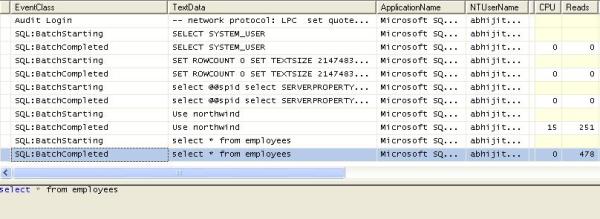
Now Click on the "Run" Button, then Trace window will come:
Screenshot - trace1.jpg
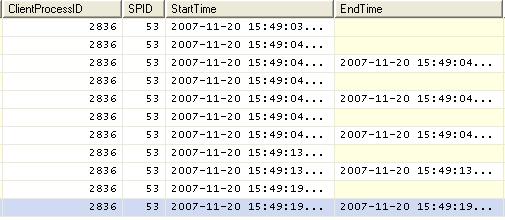
Screenshot - trace2.jpg
Figure 1.5
Using these windows, you will get the detailed time duration of a query and all other events information that you have selected.
You can save this result and use it in future. Or you can extract a particular query from the trace, just right click and click on "Extract Event Data". And save this as a SQL Script.

Reply in SQL Server Profiler

SQL Server profiler has a Reply facility which has the ability to save a trace and replay it later.
Replay is useful to troubleshoot an application. Trace replay supports debugging by using Toggle Breakpoint and the Run to Cursor options on the SQL Server Profiler Replay menu.
Anything changed in SQL Server Management Studio will be traced by the SQL Profiler. So it can basically be used for database performance check. We also have "SQL Server Performance Monitor" to monitor the System and Server performance too.

Thursday, December 22, 2011

Time difference between two columns in sql server

Suppose our requirement is to calculate working hours for Employee in particular company.
Below example is shows the how to create the table and update the Working hours for every employee.


USE tempdb
GO

/*****************************************
Copyright      :
Author           : Raju M
Date              : 12/22/2011
Module         :
Desc              : Script to Create EmpTime table.

Change History :
Name        Date        Description

SELECT * FROM EmpTime

******************************************/

IF NOT EXISTS(SELECT * FROM sys.objects WHERE TYPE= 'U' AND Name = 'EmpTime')
BEGIN
    /*    Creating the EmpTime Table    */
    CREATE TABLE EmpTime
    (
        EmployeeID INT IDENTITY(1,1) NOT NULL PRIMARY KEY CLUSTERED,
        StartingTime DATETIME NOT NULL,
        FinishingTime DATETIME NOT NULL,
        DeductBreakMM BIGINT NOT NULL,
        WorkingTime TIME(3) NULL
    )

    /*    Inserting the Data into EmpTime Table    */
    INSERT INTO EmpTime
        (
            StartingTime,
            FinishingTime,
            DeductBreakMM
        )

    SELECT '2011-12-22 09:58:07.943' AS StartingTime,
           '2011-12-22 19:18:07.003' AS FinishingTime,
           45 DeductBreakMM

    UNION ALL

    SELECT '2011-12-22 08:28:07.943' AS StartingTime,
           '2011-12-22 21:18:07.003' AS FinishingTime,
           51 DeductBreakMM


    /*    Updating the EmpTime Column in EmpTime Table    */
    UPDATE EmpTime
    SET WorkingTime = CAST(DATEADD(SS,(DATEDIFF(SS,StartingTime, FinishingTime)) - (DeductBreakMM*60),0) AS TIME(3))

END
GO

Wednesday, December 21, 2011

SQL Server 2012 (Denali)

New Features in SQL Server 2012 - RC0 Released

Microsoft SQL Server 2012 RC0 was recently released. RC stands for Release Candidate which is basically the version virtually production ready. Microsoft referred to this release as SQL Server Code Named "Denali" but has settled on SQL Server 2012 as the final name for the product.. Business intelligence (BI) is critically important to organizations both large and small. In the latest release of SQL Server, there is no shortage of BI enhancements in addition to many other enhancements. This article will give you a preview of the requirements, new features and enhancements in SQL Server 2012 (code named Denali) including:


  • Hardware and Software Requirements
  • Multi-Subnet Failover Clustering
  • Programming Enhancements, including sequences, ad-hoc query paging and full-text search tweaks
  • BI and Web Development Environment Improvements
  • Web-based Visualization
  • Data Quality Services
Keep in mind that this information is for preview only and is subject to change by Microsoft.

Hardware and Software Requirements

  • Microsoft recommends using NTFS file format instead of FAT32. FAT32 will work but you should probably not use it.
  • You can't install SQL Server 2012 (code-named Denali) on mapped drives or compressed drives.
  • You have to have the "no-reboot" package installed prior to installing SQL Server 2012 (code-named Denali). This is included in Windows 7 SP1 and Windows Server 2008 R2. Otherwise, you can download the no-reboot package from Microsoft.
  • SQL Server 2012 (code-named Denali) requires the .NET Framework 4.0.
  • Virtualization is supported using Microsoft's Hyper-V technology.
  • You will need at least 3.6 GB of free disk space.
  • Microsoft recommends that you do not install SQL Server 2012 (code-named Denali) on a domain controller.
  • Recommended Processors & RAM
    • 64-bit version: AMD Opteron, AMD Athlin 64, Intel Xeon with Intel EM64T Support or Intel Pentium IV with EM64T support running 2.0 GHz or faster. Recommended RAM is maximum that operating system supports or at least 2 GB.
    • 32-bit version: Pentium III or compatible running at 2.0 GHz of faster. Recommended RAM is maximum that operating system supports or at least 2 GB.
  • Windows PowerShell 2.0 is a pre-requisite for installing SQL Server 2012 (code-named Denali). You can get this software from the Windows Management Framework page.
  • Check out the step by step installation guide with screenshots to get a preview of the SQL Server 2012 install and configuration process.

Multi-Subnet Failover Clustering

With SQL Server 2012 (code-named Denali), you can configure SQL Server where failover cluster nodes can be connected to a completely different subnet. The subnets can be spread out to different geographical locations providing disaster recovery along with high availability. In order for this to work correctly, you will need to replicate the data across the databases involved in this configuration. The SQL Server failover cluster is dependent on the Windows Server failover cluster so this has to be set up first. Keep in mind that all of the subnets involved in this configuration must be in the same Active Directory domain.

Programming Enhancements

  • Sequences: Sequences have been requested by the SQL Server community for years, and it's included in this release. Sequence is a user defined object that generates a sequence of a number. Here is an example using Sequence.
    /****** Create Sequence Object ******/
    CREATE SEQUENCE MySequence
    START WITH 1
    INCREMENT BY 1;
    /****** Create Temp Table ******/
    DECLARE @Person TABLE
    (
    ID int NOT NULL PRIMARY KEY,
    FullName nvarchar(100) NOT NULL
    );
    /****** Insert Some Data ******/
    INSERT @Person (ID, FullName)
    VALUES (NEXT VALUE FOR MySequence, 'Jim Johnson'),
    (NEXT VALUE FOR MySequence, 'Bob Thompson'),
    (NEXT VALUE FOR MySequence, 'Tim Perdue');
    /****** Show the Data ******/
    SELECT * FROM @Person;
    The results would look like this:
    ID FullName
    1 Jim Johnson
    2 Bob Thompson
    3 Tim Perdue
  • Ad-Hoc Query Paging: Paging results in SQL Server has been discussed for years. The Order By option in the SQL SELECT statement has been enhanced in SQL Server 2012. Using a combination of OFFSET and FETCH along with ORDER BY gives you control of paging through a result set. Using this technique can really help performance by bring back only the results you want to show to your users when they are needed. The following TSQL code runs against the Person table in the AdventureWorks sample database (available from Microsoft). In the sample query below, SQL Server would return 10 records beginning with record 11. The OFFSET command provides a starting point for the SELECT statement in terms of paging, and the FETCH command provides how many records to return at a time.
    SELECT BusinessEntityID, FirstName, LastName
    FROM Person.Person
    ORDER BY BusinessEntityID
    OFFSET 10 ROWS
    FETCH NEXT 10 ROWS ONLY;
  • Full Text Search: The Full Text Search in SQL Server 2012 has been enhanced by allowing you to search and index data stored in extended properties or metadata. Consider a PDF document that has "properties" filled in like Name, Type, Folder path, Size, Date Created, etc. In the newest release of SQL Server, this data could be indexes and searched along with the data in the document itself. The data does have to be exposed to work, but it's possible now.
BI and Web Development Environment Improvements
Microsoft moved BI (Business Intelligence) closer to the end user with SQL Server 2008 R2. The Excel PowerPivot tool help users by creating a self-service reporting model. To understand the impact of SQL Server 2008 R2, check out the About.com article Why SQL Server 2008 R2 Matters to Small Business. The good news is PowerPivot is being enhanced in SQL Server 2012 (code-named Denali). Microsoft is adding KPIs and drill through, which will be really useful for all users.
Analysis Services will include a new BI Semantic Model (BISM). BISM is a 3-layer model that includes:
  • Data Model
  • Business Logic
  • Data Access
BISM will enhance Microsoft's front end analysis experiencing including Excel, Reporting Services and SharePoint Insights. Microsoft has said that BISM is not a replacement for the current BI Models but more of an alternative model. In simple terms, BISM is a relation model that includes BI artifact such as KPIs and hierarchies.
Web Based Visualization - Project Crescent
Project Crescent is the Microsoft code name for the new reporting and visualization tool expected in SQL Server 2012 (code-named Denali). Project Crescent provides drag and drop ad-hoc reporting functionality and was built entirely on Silverlight. It includes a powerful query tool and interactive storyboarding to allow a user to share visualizations of large datasets.
Read my article Project Crescent Reporting and Visualization in SQL Server 2012 (code-named Denali) for more on Crescent.
Data Quality Services
Data Quality Services is a knowledge-based approach that runs in SSIS (SQL Services Integration Services). Data quality is one of those things that you never get perfect. Microsoft is introducing "Impact Analysis and Lineage" which will give you information about what your data depends on. It also shows the lineage of the data, including where it comes from and the systems that are behind it.

Friday, December 16, 2011

How to Encrypt/Decrypt the passward in SQL Server..?

DECLARE @Name VARCHAR(100) = 'RAJU'
DECLARE @EncName VARCHAR(500)

SELECT  EncryptByPassphrase('A',@Name) EncryptByPassphrase

OutPut
======
0x010000001AB718D8402648B2CCD2C46DACFCDF7844ADD7243B8C9ECA


SELECT @EncName = EncryptByPassphrase('A',@Name)

SELECT CAST(DecryptByPassphrase('A', @EncName) AS VARCHAR(100)) DecryptByPassphrase

OutPut
======
RAJU

Wednesday, December 14, 2011

SCRIPT TO CHECK QUERY

Below query to check the current running SQL statement for a Stored Procedure.
All you need to do is, give the ‘SPID’ of the session in which the Stored Procedure is running.


SELECT SDER.[session_id], SDER.[request_id],SDER.[statement_start_offset],  
  SDER.[statement_end_offset], 
  CASE  
     WHEN SDER.[statement_start_offset] > 0 THEN 
        --The start of the active command is not at the beginning of the full command text
        CASE SDER.[statement_end_offset] 
           WHEN -1 THEN 
              --The end of the full command is also the end of the active statement
              SUBSTRING(DEST.TEXT, (SDER.[statement_start_offset]/2) + 1, 2147483647)
           ELSE  
              --The end of the active statement is not at the end of the full command
              SUBSTRING(DEST.TEXT, (SDER.[statement_start_offset]/2) + 1, (SDER.[statement_end_offset] - SDER.[statement_start_offset])/2)  
        END 
     ELSE 
        --1st part of full command is running
        CASE SDER.[statement_end_offset] 
           WHEN -1 THEN 
              --The end of the full command is also the end of the active statement
              RTRIM(LTRIM(DEST.[text])) 
           ELSE 
              --The end of the active statement is not at the end of the full command
              LEFT(DEST.TEXT, (SDER.[statement_end_offset]/2) +1) 
        END 
     END AS [executing statement], 
  DEST.[text] AS [full statement code] 
FROM sys.[dm_exec_requests] SDER CROSS APPLY sys.[dm_exec_sql_text](SDER.[sql_handle]) DEST 
WHERE SDER.session_id = 65
ORDER BY SDER.[session_id], SDER.[request_id]